
Reconciling T4 Box 24 for DNP causing Incorrect EI
GOAL: To provide a wholistic overview of how to replicate, systematically break down the root cause and the issue on hand, and reconcile EI and UI_EARNING issues that stem from Days Not Paid and EI Adjustment module.
Purpose: To guide the investigation of EI issues that can typically manifest themselves at the Year End process in Box 24, and how to reconcile the differences between Expected versus Actual values of Box 24.
Often this is due to the value of YTD DAYS_NOT_PAID Entity Code in the Payroll > Pay Process > YTD Record Adjustment, which means the EI records on the pay run are incorrect.
PROCESS OVERVIEW
STAFF MANAGEMENT > Sample EID > POSITION & ASSIGNMENT
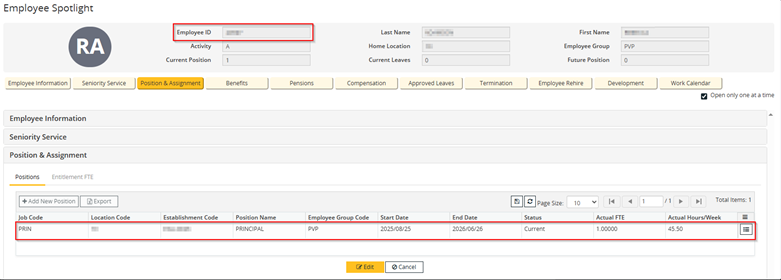
**PVP Group, Active, FTE = 1**
PAYROLL > PAY INPUTS > DNP ENTRY > Sample EID
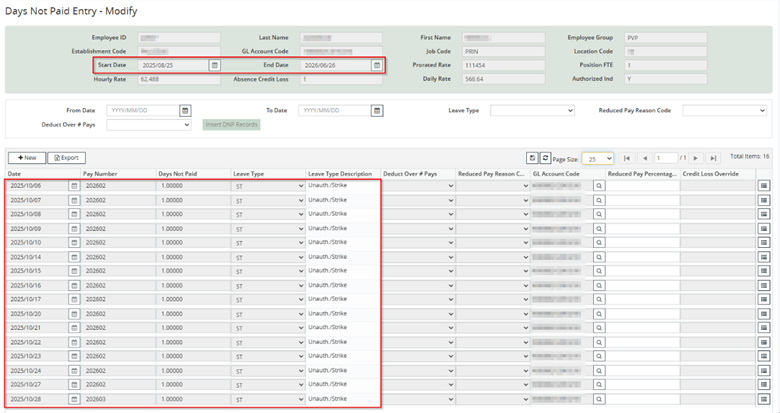
**Range of 2025/10/06 to 2025/10/28 for ST Strike Days at DNP = 1.0000**
PAYROLL > PAY PROCESS > EI ADJUSTMENT > Sample EID > 2025/10/01 to 2025/10/31
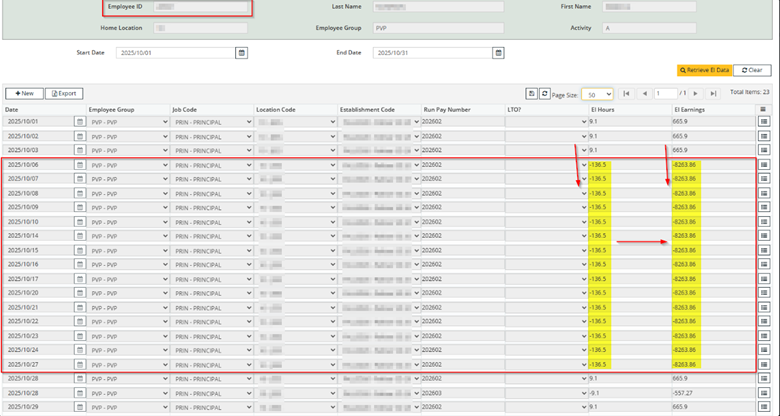
**The range of 10/06 to 10/27 (Strike DNP range) has very large negative EI Hours/Earnings values**
PAYROLL > PAY PROCESS > YTD RECORD ADJUSTMENT > Sample EID // PVP // 2025
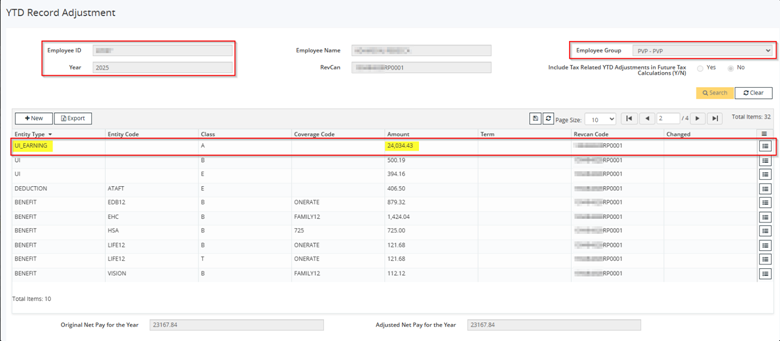
**UI_EARNINGS = 24,034.43**
PAYROLL > YEAR END > T4 ENTITY MAINTENANCE > 2025 // Box 24

**Box 24 is mapped to <ALL> (*) UI_EARNINGS for the Current Year**
PAYROLL > YEAR END > T4 & T4A GENERATION > PVP
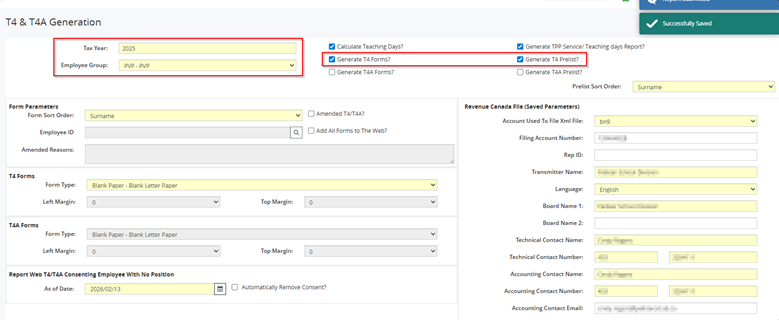
**Saved > Submitted**
REPORTS > PROCESS REPORTS > WEB T4 FORMS > Sample EID
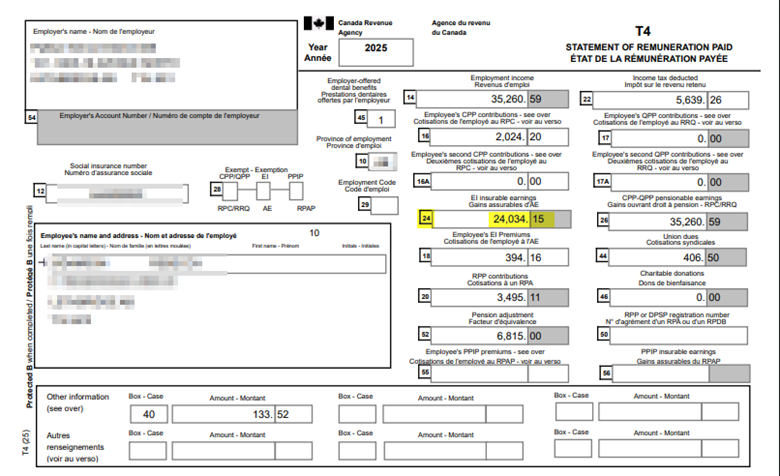
**Here we can see Box 24 matches YTD Record for UI_EARNING = 24,034.15**
------------------------------------------------------------------------------------------------------------------------------------------
IMPORTANT TAKEAWAYS
There are a series of important takeaways that the user must consider once the problem has been replicated and the process is detailed, thus outlining the irregularities along the way, as shown above.
- Conduct a review of the EI Calculations on Pay Registers to confirm this is correct
- Ensure use of ‘Show EI Hours Mismatch in Message Log’ = Yes on Pay Run module
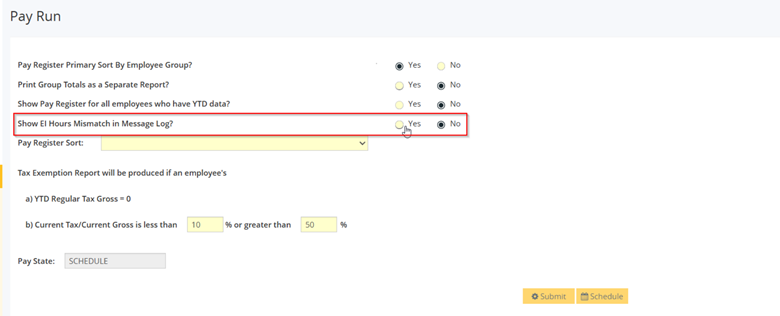
This will ensure the Message Log will specifically check for ROE related issues, and therefore EI Errors or calculation issues, in each Pay Run throughout the year.
It is best practice to ensure that when you run the pay, always make sure this is checked and make it a habit of always reviewing even the warnings on the Message Log during each pay.
Using this Check Box above will enable this functionality and make it easier to keep tabs on this throughout the year.
- Adjusting the records in PAYROLL > PAY PROCESS > EI ADJUSTMENT module
This will be necessary for reconciling EI Hours and EI Earnings on the next ROE generation for any EID impacted by this.
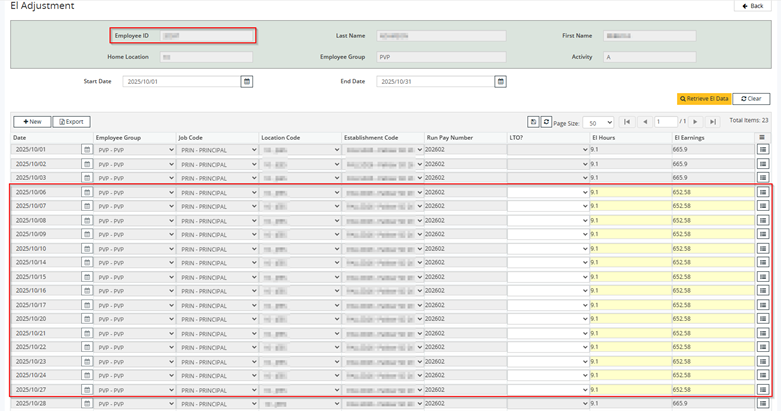
**Edit the records to reconcile the correct EI Hours and EI Earnings**
Choose SAVE to confirm your changes

**EI Adjustment create a ‘delta’ record to automatically result in the difference entered**
- Determining if EI calculates correct on the Pay Runs as it stands
IF the EI Deduction as you are seeing it in the Pay Register across 2025 was INCORRECT, then this indicates a Subject Entity Maintenance issue that has been causing incorrect calculations all year.
- In this case, you would need to adjust the YTD Record Adjustment to reconcile T4 Box 24 Amount
- It is important that Employee and Board Share records for Class = E / B are reconciled alongside the UI_EARNINGS record as well
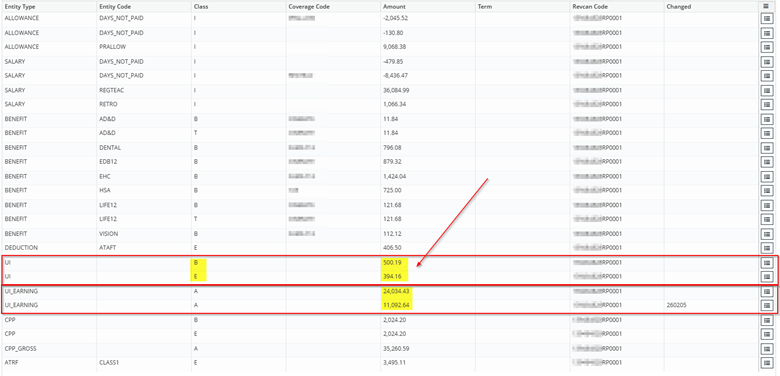
**35,127 – 24,034.15 = 11,092.85**
However, it is important to note that if you change the 24,034.15 EI Assessable to 35,127.00, but you have only taken 24,034.15 worth of deductions, then you have under deducted and this will true-up at the CRA and be owed.
Action Icon > Modify > Edit Amount for Employee Share and Board Share of ‘UI’ records > SAVE
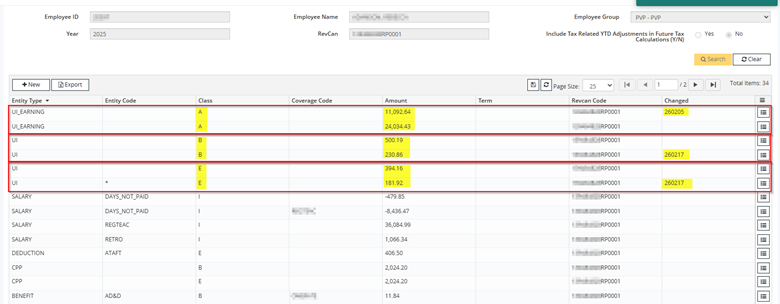
**Employee Share = 576.08 and Board Share = 731.05**
- Review and Adjust PAYROLL > YEAR END > T4 ENTITY MAINTENANCE for UI_EARNING
Depending on SEM setup, your team may want to consider adding in the below negative record for Salary // DAYS NOT PAID under Box 24.
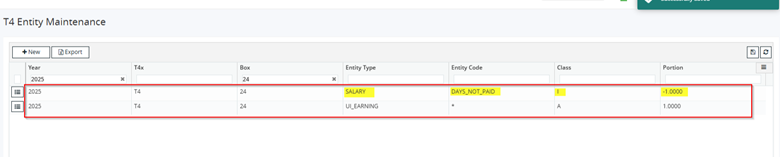
**This tells the system; “All Salary, minus Days Not Paid”**
- Considerations when collecting missing EI Assessables
IF collecting in 2026 but reporting in 2025:
- Collecting EI in 2026 pay run: Statutory Deduction screen > Overrides tab > input the employee share, board share & assessables (Gross) share and use Override Type "A" (to add it to the next pay run's natural EI deduction)
- After that pay run, input a YTD Record Adjustment to move the employee share, board share & gross from 2026 into 2025
- NOTE: If you're needing to issue the T4s before you collect the deductions in 2026, then:
- Input the YTD adjustment in 2025 in #2 below first (in order to issue the T4)
- And #1's YTD adjustment will only require the 2026 YTD adjustment because you've already done the 2025 portion in #2 below before issuing the T4.
- If you're collecting the EI before you issue T4s, then you can do the YTD adjustment to move the EI shares & Gross out of 2026 and into 2025 all at once.
- NOTE: If you're needing to issue the T4s before you collect the deductions in 2026, then:
- After that pay run, input a YTD Record Adjustment to move the employee share, board share & gross from 2026 into 2025
- 2025 T4 Adjustment (you can do this before you collect it if there's not enough time to issue T4s before you collect it): Input the override amount planned for #1 above into the 2025 year only.
IMPORTANT NOTE: Box 24 and Box 26 have a self-balancing feature whereby, if the Gross in YTDs is more than $1 different from the reverse engineered Gross (YTD Employee Share / EI Rate for that calendar year) then it takes the reverse-engineered Gross because the deduction is what needs to be accurate.
------------------------------------------------------------------------------------------------------------------------------------------
Steps to Resolve
Ensure the following is completed.
- PAYROLL > PAY PROCESS > EI ADJUSTMENT is reconciled
- This will allow for accurate ROE generation
- PAYROLL > PAY PROCESS > YTD RECORD ADJUSTMENT is reconciled
- This will update values on T4/T4A slips being generated
- Determine whether you have an <ongoing> EI Calculation issue
- If NO > Great, however if YES > Subject Entity Maintenance as Root Cause
- PAYROLL > YEAR END > T4 ENTITY MAINTENANCE is reviewed
- Specifically consider if a record should be inserted to reduce DNP from Salary in UI_EARNING
PROCESS OVERVIEW TO RESOLVE
PAYROLL > YEAR END > T4 & T4A GENERATION > PVP
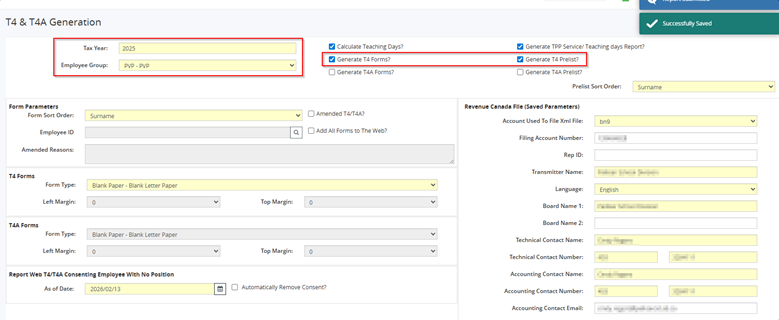
**Saved > Submitted**
REPORTS > PROCESS REPORTS > WEB T4 FORMS > Sample EID
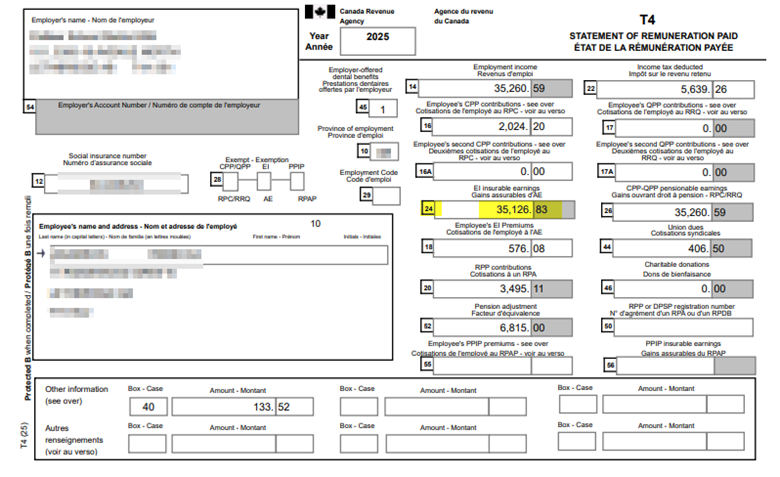
**Box 24 has successfully updated, the Root Cause addressed and CRA considerations have been outlined**
------------------------------------------------------------------------------------------------------------------------------------------